AI-Augmented Development Tooling for Small Engineering Teams
Small teams need discipline, not just tools, to unlock AI's productivity gains.
Small engineering teams now have access to AI tools across every stage of building software, yet most of them aren't seeing the payoff that access should deliver. That gap, between having the tools and getting results from them, is the real story here. Gartner projects that 60% of organizations will run smaller software teams at scale by 2029, up from just 15% in 2026. Gartner's projection that 60% of organizations will run smaller software teams at scale by 2029, up from just 15% in 2026, reflects a bet that a handful of people, working closely with AI, can outperform teams three times their size, but only if they build real discipline around how they use these tools. It's a bet that a handful of people, working closely with AI, can outperform teams three times their size, but only if they build real discipline around how they use these tools.
A typical "tiny team" today runs four or five people, sometimes as few as two or three, covering product management, UX design, and at least one AI-native engineer who treats AI tooling as core infrastructure rather than a nice-to-have. Old role boundaries don't hold up in a group this size. The designer might write SQL. The engineer might draft the onboarding copy. And with fewer people covering more ground, each engineering decision carries more weight than it did on a fifteen-person team where mistakes had more places to hide.
The gap between AI access and AI results
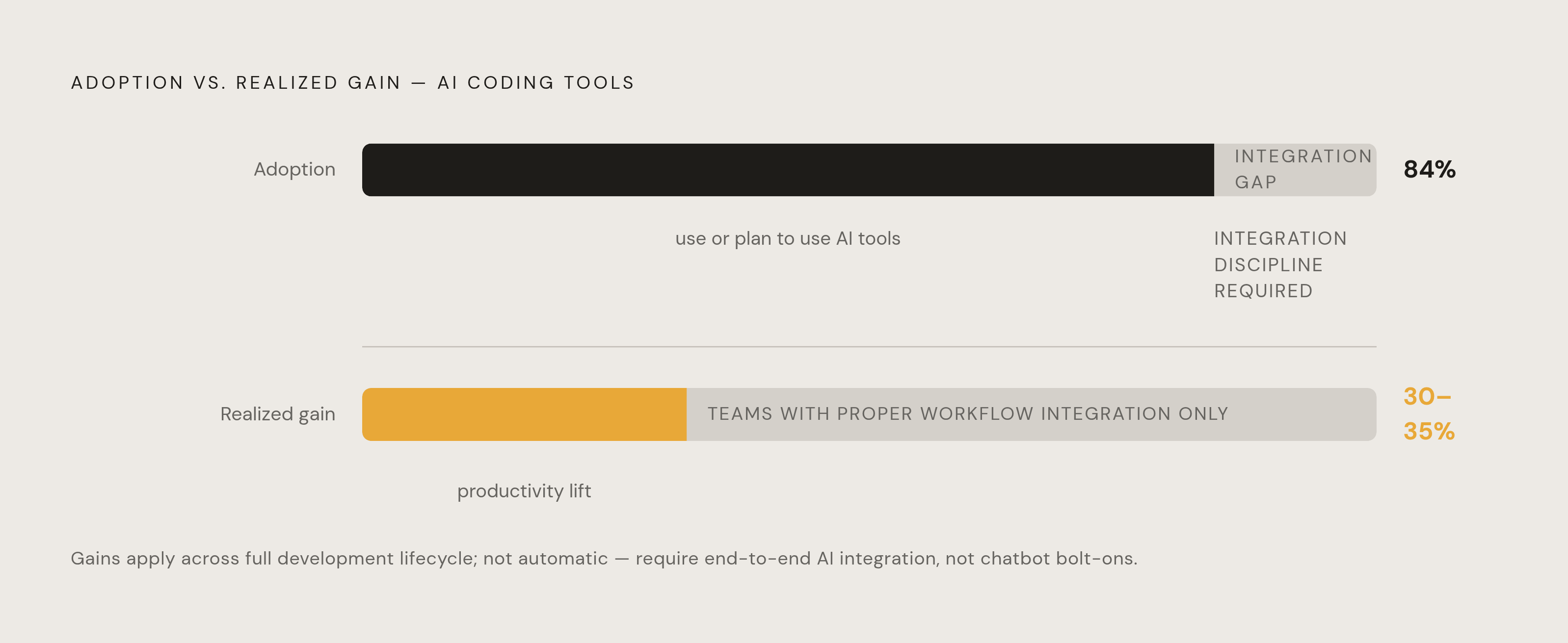
Most developers have already adopted this stuff. Something like 84% of them use or plan to use AI coding tools. Yet plenty of organizations report no real movement in delivery speed or business outcomes once you actually measure it. How does near-universal adoption produce so little measurable change?
Part of the answer lies in how developers perceive their own speed versus how fast they're actually shipping. Confidence that AI is helping and actual task completion time often move in opposite directions. A developer might feel faster while the clock says otherwise, because the AI removed friction from the parts of the job that were never the bottleneck.
The deeper issue is that AI doesn't fix a broken team. It amplifies whatever is already there. A team with fuzzy requirements, no code review discipline, or unclear ownership doesn't get better with AI in the loop. It just produces its usual problems faster and in greater volume. Meanwhile, teams that integrate AI properly across their workflow, rather than bolting a chatbot onto an existing process, can see productivity gains in the range of 30 to 35% across the full development lifecycle. Teams that integrate AI properly across their workflow, rather than bolting a chatbot onto an existing process, can see productivity gains in the range of 30 to 35% across the full development lifecycle. They just aren't automatic.
AI's role across the development lifecycle
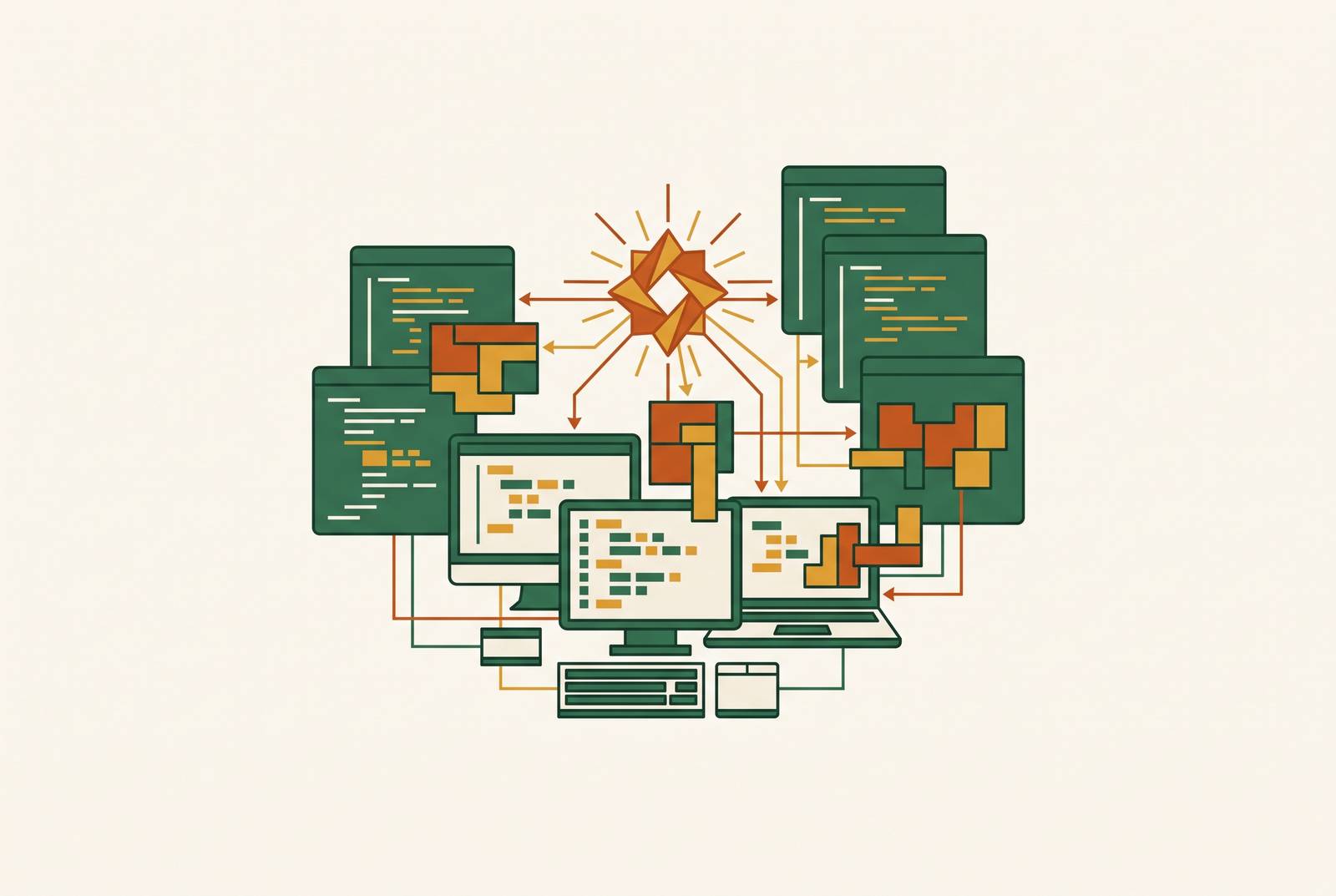
AI tooling now touches every layer of building software: ideation and planning, writing and reviewing code, testing, documentation, deployment, and monitoring once something's live. That range is why treating AI as one tool, rather than a set of choices mapped to a lifecycle, causes so much wasted effort.
It helps to separate the landscape into three categories.
Foundational chat and reasoning tools such as ChatGPT, Claude, and Gemini sit outside any specific workflow. They're a sounding board for architecture decisions, a debugging partner when a stack trace makes no sense, a research assistant for evaluating a new library. Almost every developer touches one of these before they touch anything else on this list.
Coding assistants and agents such as GitHub Copilot, Cursor, Claude Code, and Devin live inside the actual development environment. They complete lines and functions as you type, and increasingly, they act with some autonomy across multiple files, opening pull requests without a human typing every line.
Specialized lifecycle tools make up the long tail: testing tools like CloudBees Smart Tests, knowledge management platforms like Glean and Kapa.ai, code quality and debt monitoring tools like CodeScene, CodeAnt.ai, and SonarQube, and MLOps infrastructure like MLflow, DVC, and Weights and Biases.
None of these categories work in isolation. The teams getting outsized results treat them as pieces of one connected system, often wired together through a developer portal, rather than a pile of separate subscriptions that happen to coexist. But a five-person team doesn't need one tool from every category on day one. What matters is knowing where the current bottleneck sits, then picking the category that addresses that bottleneck first. A team drowning in test suite run times has a different first move than a team where onboarding a new hire takes three weeks.
Choosing a core coding assistant: GitHub Copilot, Cursor, and Claude Code compared
The three leading coding assistants have converged on a similar feature set. All three now ship a command-line interface, execute code agentically, run cloud agents that open pull requests on their own, and connect to MCP servers for extending what they can reach. The differences that matter appear in pricing, benchmark performance, and which workflow each one was built around.
GitHub Copilot offers the widest range of entry points. Pricing runs from a free tier with a limited monthly allowance, up to Pro at $10 a month, Pro+ at $39, and Max at $100, which carries the largest model allowance of any individual plan. Business runs $19 per user per month, Enterprise $39. Starting June 1, 2026, Copilot moved off premium request units and onto usage-based GitHub AI Credits, a change that matters if a team's usage is heavy or unpredictable. On independent SWE-bench evaluations, Copilot solves 56% of tasks, and it fits naturally for teams already standardized on GitHub, with support across VS Code, Visual Studio, JetBrains, Neovim, Xcode, Eclipse, and Zed.
Cursor built its reputation on inline autocomplete and an editing surface designed around AI from the ground up rather than added on top of an existing editor. Pricing starts at Pro for $20 a month, Teams at $40 per seat, with a Premium Teams seat at $120 delivering five times the usage. Pro+ runs $60 a month with three times the credit pool, and Ultra tops out at $200 with twenty times the pool, aimed at teams running agents constantly throughout the day. Cursor solves 52% of SWE-bench tasks, slightly below Copilot, but completes those tasks roughly 30% faster on average. It's become especially popular with full-stack developers doing heavy multi-file agent work.
Claude Code carries the highest capability ceiling of the three, particularly on complex reasoning and tasks that need long context to get right. It fits teams that want to go beyond general-purpose completions and need deeper control over how the model reasons through their specific problem domains. It fits best where output quality outweighs raw speed: security-sensitive systems, complex multi-step agent instructions, and situations where a wrong assumption buried in generated code costs more than the extra seconds spent reasoning through it.
None of these is a wrong choice. The right pick depends on what a team is optimizing for, speed, cost, or ceiling, and that answer can change as the team grows.
The rest of the stack: testing, knowledge, and workflow automation tools worth considering
Coding assistants get most of the attention, but they're one piece of a bigger toolkit.
On the testing side, CloudBees Smart Tests uses machine learning to predict which tests are most likely to catch a bug in a given change, then runs that targeted subset instead of the full suite. For teams whose test suites have grown slow, that targeted approach returns meaningful time across the day. It matters most for teams whose test suites have grown slow and unwieldy, where full execution has become the actual bottleneck rather than the code itself. More broadly, AI testing tools ease the tension between shipping fast and covering enough ground, without demanding that every test get written by hand.
Knowledge management is a quieter category but it eats a surprising amount of a small team's week. Glean provides search across every application a company uses, surfacing documentation, bug tickets, and the internal expert who already solved this problem six months ago. One tool builds AI chatbots trained on technical docs and support guides, which scales support coverage without pulling senior engineers into chat threads answering the same question for the fifth time. Teams using AI tooling well have cut onboarding time roughly in half, measured by how long it takes a new hire to get their tenth pull request merged, a commonly used proxy for "this person is actually productive now."
Workflow automation deserves more attention from lean teams than it usually gets. Make.com added AI Agents as first-class building blocks, launched Maia for building automations from plain-language instructions, and introduced Make Code for dropping custom JavaScript or Python directly into a workflow. For a small team, that replaces custom backend logic that would otherwise eat weeks: payment webhooks, email sequences, CRM syncing, data pipelines, built in hours instead. Pricing starts free for 1,000 operations a month, then Core at $10.59, Pro at $18.82 with priority execution, and Teams at $34.
For teams doing real model work rather than just calling foundation model APIs, MLflow covers experiment tracking, model registry, and deployment, open-source and vendor-neutral, which makes it the default for teams that want broad coverage without locking into one vendor's platform. Another tool takes a lighter approach, built around a version-control workflow and designed to slot into an existing workflow, versioning data and models the same way that version-control system already versions code. Teams mostly calling foundation model APIs, rather than training their own models, can often get by with DVC and some custom logging instead of standing up a full MLOps platform they don't need yet.
Building an MVP with AI tooling without creating tomorrow's production problem
Building a first version fast and building something that survives contact with real users are two different problems, and AI tools split cleanly along that line.
AI app builders, tools like Lovable, Bolt.new, and Replit, generate a full application from a written description and handle hosting automatically. No coding experience required. They're excellent for validating an idea before anyone commits real engineering time to it, but they're not built for systems meant to live in production for years or for anything needing deep control over infrastructure.
AI coding assistants, Cursor, Windsurf, Claude Code, sit inside a real development environment and help an experienced developer write, debug, and ship code noticeably faster. These are the tools for the production path, once the idea has proven itself worth building properly.
A sensible MVP stack depends on who's on the team. With a developer on board, a common combination pairs Claude Code or Cursor for backend logic with Lovable or Bolt.new for frontend scaffolding, and Vercel v0 for polished UI components once the rough version proves the concept. Without a developer, Lovable alone can carry the most complete path from idea to a live, working product.
AI-powered workflows typically cut traditional development time by 40 to 50%. AI-powered workflows typically cut traditional development time by 40 to 50%. An MVP that used to take three to six months can now go from idea to launch in six to ten weeks, when AI tools are combined with actual professional engineering rather than used as a replacement for it.
But that speed hides something. Compressed timelines mean less time to argue about architecture decisions before they get locked in. Fewer conversations happen about whether this database schema will hold up at ten times the current load, or whether this authentication flow has a hole in it. The complexity doesn't disappear just because it got built faster. It stacks up quietly, waiting for someone to notice.
Technical debt under AI acceleration
Technical debt already costs companies in one major economy. companies more than $2.4 trillion a year as of 2026. Organizations carrying heavy debt loads spend 40% more on maintenance and ship new features 25 to 50% slower than their peers, and developers report spending 23 to 42% of their working week just managing debt they didn't create that day. AI tooling doesn't cause this problem. It changes the speed and shape of how it builds up.
Consider velocity first. A team moving four times faster than before, thanks to AI assistance in writing code, is also generating roughly four times the volume of unreviewed assumptions, unless review depth scales up to match. It rarely does, since review time is one of the slowest parts of the process to speed up. Review time is one of the slowest parts of the process to speed up, since it still requires a human to actually think about what the code does, not just glance at it.
Then there's a subtler problem: AI-generated code tends to look clean. Consistent naming, plausible-looking patterns, reasonable variable choices. That surface polish is what makes structurally weak code slip past a review that would have caught the same weakness in messier, obviously human-written code. The bug hides behind good formatting now. It's hiding behind good formatting.
An O'Reilly study found that 60% of developers using AI coding tools admitted to deploying AI-generated code without giving it a full review, citing time pressure as the reason. An O'Reilly study found that 60% of developers using AI coding tools admitted to deploying AI-generated code without giving it a full review, citing time pressure as the reason, making it a majority under pressure that AI tooling itself helped create by raising the expectation of how fast shipping should happen. That's a majority, under pressure that AI tooling itself helped create by raising the expectation of how fast shipping should happen.
Gartner expects this to be big enough that an entire remediation industry forms around it: specialized tools and consulting services built specifically to audit, identify, and refactor the technical debt that AI-generated code leaves behind. That's a strong signal about scale. An industry doesn't form around a minor inconvenience.
Governance practices and tools that keep AI velocity from becoming reliability debt
None of the tools mentioned above are the real differentiator between a team that ships reliable software fast and a team that ships more bugs fast. That comes down to discipline: review processes that actually get followed, security scanning that runs before code merges rather than after something breaks, and clear rules for what AI is allowed to touch without a human checking first.
One practice is the 10 to 20% sprint allocation model, protected time set aside specifically for addressing technical debt, rather than treating debt reduction as something that happens "whenever there's time." There rarely is time, unless the calendar says so explicitly.
CodeScene takes an approach that deserves examination on its own terms. Rather than analyzing code in isolation, it looks at how a team actually interacts with that code over time, using a CodeHealth metric that's been checked against real engineering outcomes, not just theoretical quality scores. That lets it flag code that's actively rotting and predict which parts of a codebase are likely to cause the next incident before they do. It also reveals knowledge silos, the uncomfortable case where only one person on a five-person team actually understands how the payment module works, and includes AI-assisted refactoring to help close the gaps it finds.
Tools like this don't replace judgment. They give a small team, already stretched thin across more responsibility than headcount usually allows, a way to see the debt building up before it becomes the thing that breaks the product at the worst possible moment.